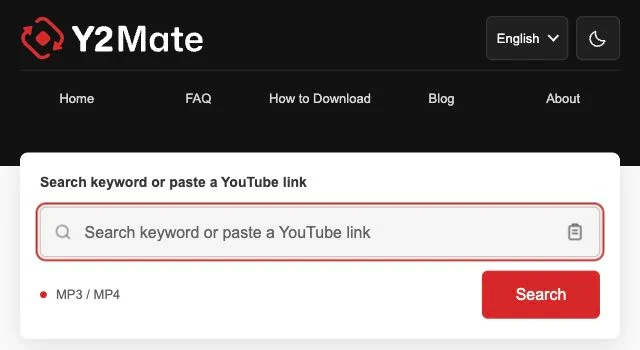
Search Keywords or Paste from the Clipboard
The same search field accepts descriptive keywords and a YouTube Link. Clipboard permission is optional: if the paste control cannot access copied text, use your device's ordinary paste command instead.

Welcome to Y2Mate, a browser-based YouTube Downloader and converter for saving MP3 music and MP4 videos when conversion is available. Find a video through keyword search or paste a YouTube Link to reach its format choices directly. The Y2Mate Converter brings discovery, format selection and browser saving into one workflow, with available downloads determined by the source and conversion service.
The local chart is temporarily unavailable. Search for a title or artist above.


Start with a song title and artist, then use Search to display matching videos. If you already have the intended YouTube Link, paste it into the search field and use Convert.
Choose the matching video from the results, checking its creator and length. Open its conversion choices and select MP3 for listening or MP4 when you also want the video.
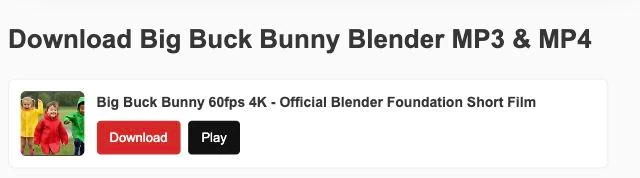
After preparation, select Download to begin the browser transfer. Accept a save-location prompt if one appears, and wait for the browser to mark the transfer complete before looking for the file.
The same search field accepts descriptive keywords and a YouTube Link. Clipboard permission is optional: if the paste control cannot access copied text, use your device's ordinary paste command instead.
Explore Trending charts when you want music discovery rather than a specific title. Trending Download starts a song search, while Download beside a related song opens conversion for that selection.
Use the interface's appearance control to choose a light or dark presentation. This changes how the browser page looks, not the selected video's quality, conversion availability or downloaded file.
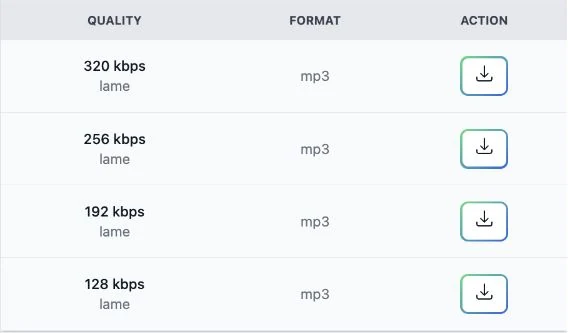
An MP3 download suits listening without storing the accompanying video. This YouTube MP3 Downloader may offer MP3 320kbps, 256kbps and 128kbps, depending on the source and conversion service. For the same duration, 320kbps generally takes more space, 256kbps offers an intermediate size, and 128kbps favors smaller files. A higher setting cannot restore missing detail. Choose from the options actually shown, considering both storage and the quality of the original music.
Keep the visual explanation in a tutorial or demonstration by selecting MP4. The YouTube MP4 Converter may offer HD choices such as 1080p and 720p, alongside 480p, 360p, 240p and 144p. Availability depends on the source and converter. Higher resolutions can help with small on-screen text, while lower choices usually reduce storage and transfer needs. Not every video provides all resolutions, and choosing a larger setting cannot repair an unclear source.
Keyword search is useful when you remember a song but have not chosen a particular video. Include the artist, title and version to reduce unrelated matches, then compare durations before selecting. A known YouTube Link avoids that search stage and opens the converter for one identified video. Paste only the address, without a caption or surrounding message, so the form can recognize it correctly.
Run the YouTube Converter in a current browser on Android, iPhone or desktop, with no required software installation. Once a transfer finishes, open the browser's downloads list to locate the file. Android commonly uses a Downloads folder; iPhone destinations can be found through Files and browser settings. Desktop browsers often provide a show-in-folder action. Saving and playback depend on storage, permissions and device support, so check the destination before repeating a download.
Recognized single-video YouTube Links include watch-page, shortened share and embedded-video addresses. Each conversion concerns one video; recognition opens the converter but does not establish source availability or successful conversion.
youtube.com/watch?v=VIDEO_IDyoutu.be/VIDEO_IDyoutube.com/shorts/VIDEO_IDm.youtube.com/watch?v=VIDEO_IDyoutube.com/embed/VIDEO_IDBrowser downloading requires care because third-party pages and advertisements can change. Keep browser updates and security protections enabled, and close suspicious advertisements that imitate download controls or urgent device alerts. Never supply a password to obtain a file. Reject unwanted installation requests and unrelated notification permissions; the described workflow needs neither. If a saved file has an unexpected executable extension, do not open it as music or video.
First identify where the process stopped. For an unrecognized YouTube Link, copy the complete address again and remove surrounding text. For an MP3 conversion error, check whether the video remains accessible and whether the service reports a temporary problem. If preparation succeeds but saving fails, inspect browser download permissions, available storage and connection status. Wait before retrying a service error, and respect source restrictions rather than attempting to work around them.
Disclaimer: Y2Mate is an independently operated YouTube downloader and converter. It is not affiliated with, endorsed by, or sponsored by YouTube or Google. YouTube and related names belong to their respective owners. References to those services describe compatible links and do not imply an official partnership.
Download only content that you own or have permission to save. Follow the applicable licence conditions, including attribution where required, as well as copyright law and YouTube's Terms of Service. Personal or non-commercial use does not automatically grant permission to copy or redistribute someone else's content.
Download Tips for Video Selection and File Storage
Check the creator and duration before committing to a similarly titled video, especially when several versions appear. Pick a bitrate or resolution that fits your listening or viewing needs instead of choosing the largest file by default. Locate the completed download through browser history, then give it a useful filename so it is easier to distinguish from later saves.
Y2Mate is a browser-based downloader and converter for available YouTube videos. It connects a selected video with MP3 or MP4 conversion choices, then provides a download when preparation succeeds. Keyword searches first require a result selection; a recognized YouTube Link goes directly to conversion.
Paste a YouTube Link or search for the intended video, then select the matching item. Choose MP3 and an available bitrate before requesting conversion. Use Download when offered, and check that the browser transfer finishes; selecting the format alone does not save the file.
Browser use is free, but usage limits, temporary restrictions and third-party availability can affect requests. Mobile data charges may apply through your provider. Treat separate payment offers cautiously: an advertisement or third-party subscription should not be mistaken for the website's basic conversion workflow.
You can use the service in a browser without installing an app, extra software or an extension. A prompt demanding a helper installation is not part of the described process. Close unexpected installation pages rather than accepting them to continue a download.
On Android, open your browser's downloads menu or the device's file manager. On iPhone, inspect the browser's download destination and look in Files. Folder names can vary with settings, and a downloaded MP4 does not necessarily appear in your photo library automatically.
The YouTube MP3 Converter can present MP3 bitrates of 320kbps, 256kbps and 128kbps, depending on the source and conversion service. Compare storage needs with source quality: a larger bitrate generally increases file size, but cannot add musical detail absent from the original.
Choose MP4 when gestures, diagrams or other visual details are essential. It retains video and sound together, whereas MP3 is intended for listening. Select a resolution offered for that source, balancing legibility against file size and checking whether your preferred player supports the saved video.
The address may be incomplete, contain extra text or point to a removed or restricted video. Check that the YouTube Link opens the intended video normally, then copy it again. Recognizing an address cannot make private or otherwise inaccessible material available for conversion.
MP3 preparation may be interrupted by a service outage, connection problem or changed source availability. Note any error message and wait before trying again. If the same failure returns, avoid repeated submissions; check the source and any service notice before making another request.
Check the file type and browser security messages before opening anything. Avoid suspicious advertisements and installers presented as required updates, and never enter credentials into a download prompt. An MP3 or MP4 download should not require running an executable; discard unexpected files rather than testing them.
No YouTube account or sign in is required to search, select a video or request conversion. Do not share YouTube credentials with the downloader or a redirected page. This account-free workflow does not change access restrictions on the source video.
Confirm that you have copyright permission or another valid basis under applicable law, and consider YouTube terms separately. Permission to watch does not automatically permit downloading, sharing or reuse. Check relevant licence conditions and ask the rights holder when the permitted use is unclear.